
How to Extend Your Ethernet Cable: 5 Methods Beyond 100 Meters
Need to extend an Ethernet cable beyond 328 feet (100 meters)? Whether you’re connecting an IP security camera, a remote building, a warehouse, or an industrial network, there are several ways to increase Ethernet distance without compromising your network design.
The best method depends on the distance, existing cabling, bandwidth requirements, available power, and installation environment.
Quick answer: A standard copper Ethernet channel generally supports up to 100 meters (328 feet). For longer distances, you can install an intermediate network switch, use a purpose-built Ethernet Extender, deploy fiber optic equipment, or establish a point-to-point wireless bridge. An RJ45 coupler can join shorter cables but does not increase the standard Ethernet distance limit.
Why Is Ethernet Limited to 100 Meters?
Standard twisted-pair Ethernet technologies such as 100BASE-TX and 1000BASE-T are designed around a maximum 100-meter channel. Cable attenuation, crosstalk, insertion loss, and other electrical characteristics affect reliable communication.
The 100-meter limit applies to an individual standards-compliant copper Ethernet segment, not necessarily the total distance between network endpoints.
For example, you can connect two 100-meter segments through an active network switch to create approximately 200 meters of total reach.
For substantially greater distances, specialized technology can transmit Ethernet traffic using a different signaling method over existing copper infrastructure.
Ethernet signals are electrical impulses carried through copper twisted-pair cabling. As they travel, electrical resistance builds up at roughly 10 ohms per 100 meters of Cat5e cable. Past 328 feet (100 meters), that resistance causes signal degradation — slower speeds, dropped packets, and eventually complete connection loss.
This is why the IEEE 802.3 standard caps a single Ethernet cable segment at 100 meters. It’s not an arbitrary rule — it’s the point at which signal quality can no longer be guaranteed. To extend your ethernet cable run past this boundary, you need active hardware that regenerates the signal.
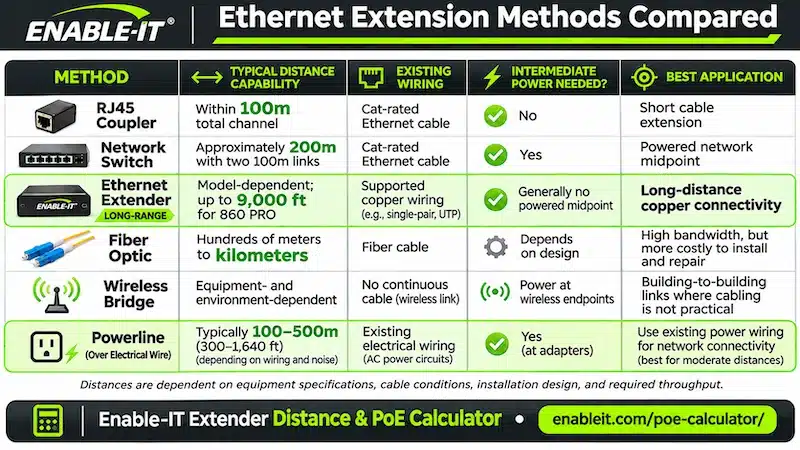

5 Ways to Extend an Ethernet Cable
Core guide: Five extension methods
What You’ll Learn
- Method 1 — Inline RJ45 Coupler (under 100m only)
- Method 2 — Network Switch or Hub
- Method 3 — Ethernet Extender (up to 9,000 ft)
- Method 4 — Powerline / Ethernet Over Existing Wire
- Method 5 — Wireless Bridge (WiFi backhaul)
- Comparison table: which method is right for you?
- Frequently Asked Questions
Method 1: Use an RJ45 Coupler for Short Extensions
An RJ45 female-to-female coupler connects two Ethernet patch cables to create a longer cable assembly.
Best for: Short indoor extensions that remain within the supported Ethernet channel length.
Advantages:
Inexpensive and simple to install
No electrical power required
No network configuration
Limitations: A coupler does not regenerate or convert the Ethernet signal. Adding a coupler also introduces another connection point that must meet cabling performance requirements.
Recommendation: Use a quality-rated coupler for short connections, not for exceeding 100 meters.
Method 2: Install an Ethernet Network Switch
An Ethernet switch receives traffic on one port and forwards it to another, allowing the next Ethernet link to operate as a separate cable segment.
A switch installed between two copper runs can create approximately 200 meters of end-to-end reach, assuming each segment stays within its supported distance.
Best for: Commercial buildings, network closets, and installations where electrical power is available at an intermediate location.
Advantages:
Supports standard Ethernet equipment and speeds
Provides additional Ethernet ports
Uses familiar networking hardware
Limitations: The intermediate switch requires suitable power and environmental protection. Longer networks may require additional switches.
Recommendation: Use a switch when a convenient powered midpoint already exists.
Method 3: Use a Long-Distance Ethernet Extender
Best for: Extending Ethernet beyond 100 meters using existing copper wiring.
An Ethernet Extender is designed to carry Ethernet traffic over distances that exceed conventional twisted-pair Ethernet channel limits.
Rather than simply joining two Ethernet cables, an extender uses specialized signaling technology to establish a longer-distance connection between locations.
Depending on the model, Ethernet Extenders can use suitable existing twisted-pair telephone wiring, Cat-rated cabling, or other supported copper media.
This can eliminate the need to install new network cable or construct additional powered network closets.
How a Long-Distance Ethernet Extender Works
A typical installation includes:
A local Ethernet Extender connected to the existing network.
An available copper wire pair connecting the two locations.
A remote Ethernet Extender converting the long-distance link back to standard Ethernet.
Ethernet devices connected at the remote location.
The result is a practical way to extend network connectivity to remote cameras, buildings, access-control equipment, industrial devices, and other network endpoints.
Enable-IT 860 PRO Extender Ethernet Gigabit
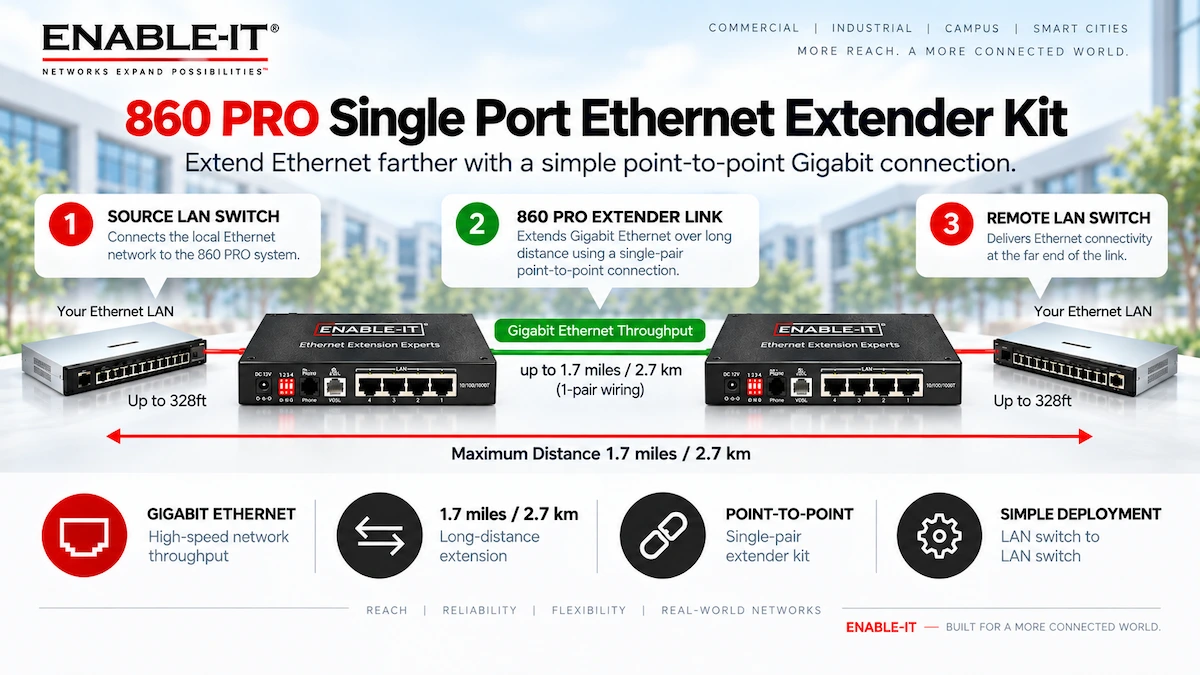
860 PRO installation diagram: Long-distance Ethernet connectivity between two network locations using existing single-pair copper wiring. Actual interlink throughput depends on distance and cable conditions.
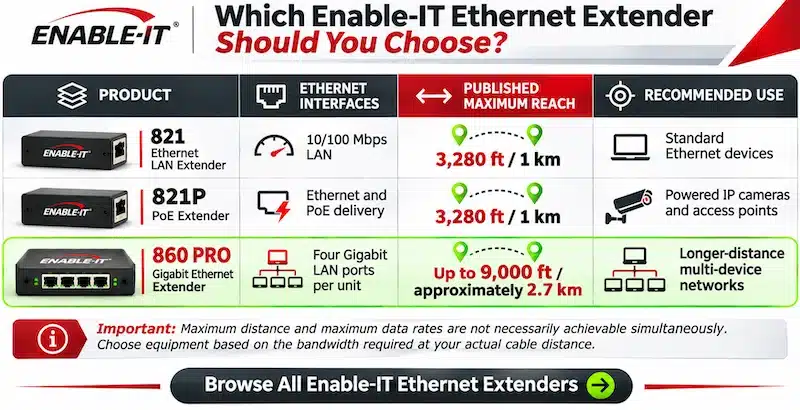
El Enable-IT 860 PRO provides four Gigabit Ethernet LAN ports on each unit and is designed for long-distance Ethernet connectivity over suitable single-pair copper infrastructure, with a published maximum reach of up to 9,000 feet (approximately 2.7 km).
The Gigabit LAN port rating should not be confused with guaranteed throughput across the full extended cable distance. Actual performance depends on cable type, wire gauge, link length, interference, and installation conditions.
Recommended applications: Campus connectivity, industrial networks, remote equipment locations, and multi-device network installations.
Enable-IT 821 Extender de red Ethernet

Enable-IT 821 Ethernet LAN Extender: A professional long-distance networking solution for mission-critical copper Ethernet infrastructure.
El Enable-IT 821 Extender de red Ethernet provides 10/100 Mbps Ethernet connectivity over suitable copper wiring at distances of up to 3,280 feet (1 km).
It is particularly useful for applications that do not require Gigabit bandwidth but need dependable connectivity beyond conventional Ethernet cabling limits.
Recommended applications: IP surveillance cameras, access-control systems, industrial controllers, building automation, and remote LAN equipment.
View the Enable-IT 821 Ethernet LAN Extender
Need to Extend Both Ethernet and PoE?
For remote devices that require electrical power through their network connection, a conventional data-only Ethernet Extender may not be sufficient.
El Enable-IT 821P Extender PoE is designed to extend both connectivity and power delivery over supported copper wiring, with a published maximum distance of up to 3,280 feet (1 km).
It is an option for remote IP cameras, wireless access points, and other supported PoE devices.
Available power at the destination depends on the installation, cable characteristics, and equipment requirements. Verify the PoE power budget before deployment.
View the Enable-IT 821P PoE Extender
Method 4: Powerline / Ethernet Over Existing Wire
Powerline networking and specialized Ethernet Extenders can use certain types of existing wiring to transmit network data without installing new Ethernet cables.
Depending on the technology and equipment selected, existing telephone wiring, coaxial cables, or building electrical circuits may provide alternative network paths.
What’s possible over existing wiring:
Telephone wiring (UTP): Specialized copper Ethernet Extenders can transmit data over existing telephone wire pairs for long-distance connections. Some systems support distances exceeding 1 kilometer, depending on cable conditions and required throughput.
Coaxial cable: Ethernet-over-Coax Extenders can reuse existing coaxial infrastructure for IP cameras, security systems, and remote networking. Supported bandwidth and maximum distance depend on the equipment model.
Electrical wiring (Powerline): Powerline adapters transmit network data over building electrical circuits. Actual throughput and reliability depend on circuit layout, electrical noise, and connected equipment.
Advantages:
Reuses existing infrastructure
May eliminate expensive cable replacement
Reduces installation disruption
Provides networking options where new cable installation is impractical
Limitations:
Performance depends on wiring quality and condition
Electrical noise can significantly affect powerline networking
Building electrical circuits may create communication barriers
Powerline adapters are not interchangeable with telephone-wire or coaxial Ethernet Extenders
Enable-IT Recommendation: For professional long-distance networking, choose an Ethernet Extender designed specifically for the available copper medium. Dedicated Ethernet Extenders are generally preferable to consumer powerline adapters when predictable link performance and documented distance capabilities are required.
Method 5: Use a Point-to-Point Wireless Ethernet Bridge
A wireless bridge connects two Ethernet networks using directional radio equipment installed at the endpoints.
It is useful when there is no suitable existing cable route between locations.
Best for: Connecting separate buildings where installing physical cabling is impractical.
Advantages: No continuous physical cable required, flexible deployment, and a range of bandwidth options.
Limitations: Performance depends on radio conditions, frequency, interference, antenna alignment, and adequate clearance of the wireless path.
Important considerations before going wireless:
- Security risk: anything transmitted wirelessly can be intercepted and decoded. WiFi traffic is vulnerable to man-in-the-middle attacks, packet capture, and MAC address spoofing (WiFi Pineapple attacks)
- Performance: wireless links degrade with distance, obstacles, and RF interference
- Reliability: wired connections are always more stable for critical applications
- Antenna placement: point-to-point antennas need line-of-sight at least 30 feet above ground to avoid signal loss from the Fresnel zone reflecting off the earth’s surface.
Modern encrypted wireless bridges can be secure when correctly configured, although radio-based connections have different environmental and security considerations from wired links.
Recommendation: Consider a wireless bridge when a wired link is unavailable or uneconomical.
How to Install an Ethernet Extender
Before installation, confirm the available wire type, condition, continuity, and distance.
Step 1 — Identify the cable: Determine whether the available infrastructure is Cat-rated twisted pair, telephone wiring, or another medium supported by the selected extender.
Step 2 — Measure the distance: Establish the approximate physical wire length rather than relying only on the straight-line distance between buildings.
Step 3 — Select the equipment: Match the extender to the required bandwidth, number of Ethernet ports, environmental conditions, and PoE power requirements.
Step 4 — Connect the local and remote units: Follow the manufacturer’s wiring diagram, power instructions, and approved installation procedure.
Step 5 — Verify link performance: Confirm stable link establishment, data throughput, packet loss, and operation of the connected network devices.
For outdoor and building-to-building copper connections, evaluate grounding, surge protection, lightning exposure, and applicable electrical codes before installation.

Which Method Is Right for Your Situation?
| Method | Max Range | Needs Power? | Ideal para | Costo |
| RJ45 Coupler | Under 100m | No | Short extensions on a budget | $ |
| Network Switch | ~200m (2 hops) | Yes (midpoint) | Medium distance with existing outlet | $$ |
| Extensor Ethernet | Up to 9,000 ft | Yes (endpoints) | Long distance, industrial, government | $$$ |
| Powerline / Coax | Up to 6,500 ft | Yes (endpoints) | Reusing existing wire infrastructure | $$$ |
| Wireless Bridge | Variable | Yes (both ends) | Only when no wired path is possible | $$$ |
What Is The Maximum Distance For An Ethernet Cable?
A single run of ethernet cable is designed to work at a maximum distance of 100 meters, or 328 feet. You can acquire commercially available single-piece Ethernet cables that are longer than 100 feet, but using them can result in various issues, like reduced performance and loss of signal. This is particularly true for older Cat5 cables, which are limited to 100 Mbps.
However, you can place a network switch, or some other kind of ethernet extender, between two 100-meter cable runs to extend the overall reach.
| Category | Frequency | Max Data Rate | Distancia máxima |
|---|---|---|---|
| Cat 5 | 100MHz ~ 350MHz | 100 Mbps | 328′ / 100m |
| Cat5e | 100MHz ~ 350MHz | 1,000 Mbps / 1 Gbps | 328′ / 100m |
| Cat6 | 250MHz ~ 550MHz | 1,000 Mbps / 1 Gbps | 328′ / 100m |
| Cat6a | 250MHz ~ 550MHz | 10,000 Mbps / 10 Gbps | 328′ / 100m |
| Cat7 | 600MHz | 10,000 Mbps / 10 Gbps | 65′ / 20m |
| Cat7a | 1000MHz | 40,000 Mbps/ 40 Gbps | 65′ / 20m |
| Cat8 | 2000MHz | 25 Gbps or 40 Gbps | 65′ / 20m |
To go beyond the distance limits for traditional Ethernet – use an Enable-IT Ethernet Extender Solution. These kits can go up to 1.5Gbps and use existing wiring up to 3,280ft / 1 km.

Frequently Asked Questions
Can you extend an ethernet cable beyond 100 meters?
Yes — but not with a passive coupler alone. You need active hardware that regenerates the signal: a network switch, an ethernet extender, or a media converter. Enable-IT Ethernet Extenders extend a single ethernet run up to 9,000 feet (2,743 meters) over one wire pair.
How do I extend an ethernet cable without losing speed?
Use an Ethernet Extender rated for your required distance. Enable-IT extenders maintain Gigabit speeds (up to 1.5 Gbps) across the full extended run. Passive couplers do not reduce speed on their own, but they cannot extend past the 100-meter limit, and loose connections can introduce signal loss.
Can I join two Ethernet cables together?
Yes. An RJ45 coupler can join two compatible Ethernet cables. The resulting channel must still meet the applicable Ethernet cabling specifications.
What is the maximum length for an ethernet cable?
A single ethernet cable segment is limited to 100 meters (328 feet) under the IEEE 802.3 standard. With an Ethernet Extender, you can push a single logical link up to 9,000 feet on 1 wire pair. Daisy-chaining multiple extenders extends this even further.
How do I extend an ethernet cable in a wall without rewiring?
Use an Ethernet Extender or powerline adapter that runs over your existing telephone or coaxial wiring inside the walls. Enable-IT extenders work over a single existing wire pair — no new conduit or cable pulls required.
Can I extend an RJ45 cable beyond 100 meters?
Yes. An RJ45 ethernet extender (like the Enable-IT 821 or 860) takes the RJ45 signal from your switch or router and transmits it over a long-distance interlink wire, converting it back to standard RJ45 at the remote end. Your devices see a normal ethernet port regardless of distance.
How do I extend an ethernet cable to an outbuilding or garage?
The most reliable approach is an Ethernet Extender over existing telephone or electrical wiring between the buildings — no trenching required. The Enable-IT 860 PRO works over any single wire pair up to 9,000 feet. If no wiring exists, a wireless bridge is the fallback, though it introduces security tradeoffs.
What is an ethernet wire extender vs. an ethernet cable extender?
These terms are used interchangeably. Both refer to a device (or pair of devices) that regenerates an ethernet signal to extend it past the 100-meter limit. ‘Ethernet extender’ and ‘ethernet cable extender’ both mean the same category of hardware.
How do you extend a LAN cable beyond 100 meters?
The same methods that apply to ethernet apply to LAN cable (LAN cable is ethernet cable). Use a network switch at the midpoint for up to 200 meters, or an Ethernet Extender for distances up to 9,000 feet on a single wire pair.
Ready to Extend Your Ethernet Cable?
Get the Right Ethernet Extender for Your Network
Extending Ethernet beyond 100 meters does not always require replacing existing cabling, adding intermediate network switches, or installing new fiber.
Enable-IT manufactures professional Ethernet Extender and PoE Extender solutions for commercial, industrial, security, and mission-critical networking applications.
Whether your project requires 500 feet, 1,000 feet, or several thousand feet of reach, selecting the right equipment begins with understanding your wire type, bandwidth requirements, and installation conditions.
Ready to extend your network?
Shop Ethernet Extender Solutions
Buy the 821 Ethernet LAN Extender
Buy the 860 PRO Gigabit Ethernet Extender
Enable-IT has been engineering Ethernet Extender solutions since the 1990s — we invented the category. Our US-manufactured extenders are trusted in federal government networks, aerospace, industrial, and commercial deployments worldwide.
Call or chat to get a recommendation for your specific cable run:
- (888) 309-0910 | Mon–Fri 5AM–4PM PST
- Browse Ethernet Extender solutions at enableit.com/ethernet-extender/
- Browse PoE Extender solutions for power + data over distance
Related Guides
Find the Right Ethernet Extender With Our Free Distance and PoE Calculator

Not sure which Ethernet Extender or PoE Extender is right for your installation?
El Calculador de distancia y PoE de Enable-IT Extender helps you identify compatible networking solutions based on your actual installation requirements.
Simply enter your cable distance, existing wire type, required network speed, and PoE power requirements to compare suitable Enable-IT products.
With the free calculator, you can:
Calculate Ethernet extension distance beyond the standard 328-foot (100-meter) limit.
Check existing cable compatibility, including single-pair copper, Cat-rated wiring, and coaxial cable.
Compare Ethernet Extender models based on their published distance and speed capabilities.
Estimate PoE power requirements for IP cameras, wireless access points, PTZ cameras, and other powered devices.
Find compatible Enable-IT solutions with direct links to product information and purchasing options.
Plan Your Ethernet Extension Before You Buy
Open the Free Enable-IT Extender Distance and PoE Calculator
No guesswork. Compare supported distance, data speed, and available PoE power before selecting your equipment.
Calculator results are planning estimates. Actual performance depends on wire gauge, cable condition, installation distance, connected devices, and equipment specifications.

Extend any ethernet cable beyond the limits with Enable-IT solutions !
El beneficio de comprar un Extender Ethernet de Enable-IT es que nuestro equipo aprovecha las señales de telecomunicaciones de alta velocidad a través de cualquier cable, incluidos el cable coaxial, la valla de alambre de púas, etc. Esto permite distancias inimaginables en el sector. Soluciones de extender la conexión Ethernet disponible que puede extender este límite de distancia hasta los 9.000 pies o 2.743 m.
Las aplicaciones de la industria son infinitas: todos necesitan extender la vida útil del Ethernet en algún momento de su vida útil, y antes tarde que temprano se producirá la necesidad, y estamos listos para ayudarle a seleccionar la solución adecuada.
Entre los clientes de la industria diversa se encuentran el Ejército de los Estados Unidos, el Reino Unido y Canadá; la NASA; fabricantes de aeronaves y aeroespaciales; Infraestructura náutica (Marinas, mega yates, buques de cruceros, instalaciones portuarias, flota submarina de misiles nucleares de Estados Unidos, etc.); Expertes en Vigilancia y Seguridad por Video; Avanzado Empresas de telecomunicaciones; Extrema minería Operadores; Global Empresas de construcción; Comercial Empresas agrícolas; importante Proveedores de atención sanitaria; En vivo Entretenimiento, Emisión de televisión, y agencias de noticias; Extreme Organizaciones de retail/POS; Distancia larga Empresas de educación; Internacional Empresas de hostelería; Fabricantes de ascensores, señalización digital y mucho más.




 English
 Español de Colombia
 Português do Brasil